Elevation Finder on Map By Address

Click anywhere on the map or search an address to instantly find the elevation in metres and feet. Open fullscreen ↗

Loading map…
Data Source
SRTM90m — 90-metre resolution global satellite data
Coverage
Global coverage between 56°S and 60°N latitude
Output
Elevation in metres & feet with DMS coordinates
Rate this tool:

Find Elevation for Any Location on Earth

Our Map Elevation Finder lets you find the altitude of any location on Earth for free. The tool uses SRTM90m (Shuttle Radar Topography Mission) data — a globally consistent digital elevation model collected by NASA at approximately 90-metre (3 arc-second) horizontal resolution. The data is open-source, freely available, and updated periodically to correct artefacts and voids.

Whether you are planning a hike, assessing flood risk, or simply curious about the terrain beneath a specific address, this tool gives you an instant answer — no software to install, no sign-up required.

Key Features

  • Search by Address, Postal/Zip Code, or Place Name — powered by OpenStreetMap Nominatim
  • Search by Coordinates — enter decimal latitude/longitude directly in the search box
  • My Location — uses your device GPS to find your current elevation instantly
  • Click Anywhere — click any point on the map to get the elevation at that point
  • Basemap Switcher — toggle between Street, Satellite (Esri), and Terrain views
  • Lat/Lng Bar — live coordinate display as you move the cursor
  • Metres + Feet — results shown in both imperial and metric units
  • DMS Coordinates — popup shows degrees, minutes, seconds for the clicked point

How to Use the Elevation Finder — Step by Step

1Open the tool and locate your area

The map opens centred on the world. Pan and zoom to the area of interest, or go straight to the search bar.
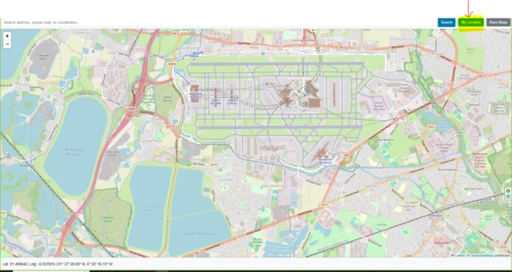
Open the tool and locate your area
2Search by address or place name

Type an address, city, postcode, or landmark into the search box and press Enter. The map will zoom to the location automatically.
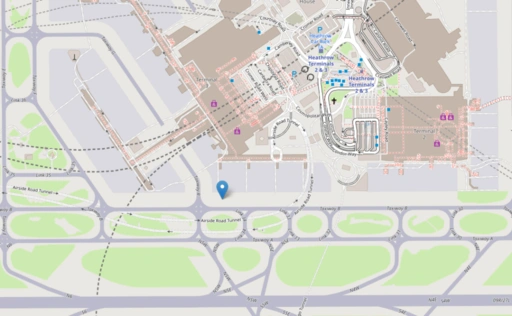
Search by address or place name
3Click the map to get elevation

Click any point on the map. A marker is placed and a popup shows the elevation in metres and feet, plus the DMS coordinates of that point.

Click the map to get elevation
4Switch basemap for context

Use the Street / Satellite / Terrain buttons to change the background map. Terrain view is useful for visualising how elevation changes across a landscape.
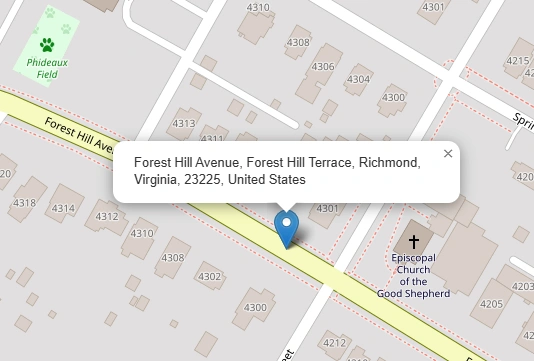
Switch basemap for context
5Use My Location for your current altitude

Click "My Location" to move the map to your GPS position and immediately get your current elevation. Useful for hikers and field workers.
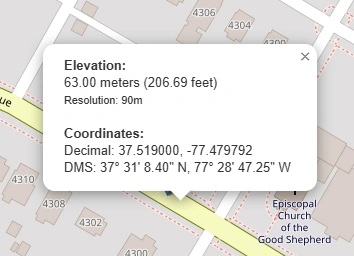
Use My Location for your current altitude

Who Can Benefit from This Tool?

Civil EngineersRoad, bridge, and drainage design all depend on accurate terrain elevation data.
SurveyorsCross-check field measurements against satellite elevation for rapid desktop analysis.
Urban PlannersUnderstand slope and catchment before submitting development plans.
Environmental ScientistsAssess watershed gradients, flood plains, and ecological zones.
Real Estate ProfessionalsCheck whether a property sits in a low-lying flood-risk area.
Hikers & Outdoor EnthusiastsPlan routes with realistic elevation profiles and summit heights.
Telecoms & Radio EngineersLine-of-sight calculations require ground elevation between antennas.
Disaster ManagementMap evacuation corridors and identify low-lying areas vulnerable to flooding.
Photographers & FilmmakersScout high-ground locations for sunrise/sunset shots and aerial work.
Agricultural PlannersWater runoff, irrigation gradient, and erosion risk all depend on land slope.
Real-world example: New Orleans, Louisiana sits largely below sea level — some neighbourhoods are 2–3 m below the surrounding levees. A quick elevation check on this tool reveals exactly which streets are most exposed to storm-surge flooding, demonstrating why accurate terrain data is critical for infrastructure planning and emergency response.

Base Map Switcher

The elevation finder includes three basemap options to give the best visual context for your query:

  • Street — CartoDB Voyager clean modern style with road names and place labels (default). Falls back automatically through CartoDB Light → OSM Humanitarian → Standard OSM if tiles are unavailable.
  • Satellite — Esri World Imagery high-resolution aerial and satellite photography, useful for identifying land features.
  • Terrain — Esri World Topo Map with shaded relief, contour cues, and natural colour, making slope and ridgelines immediately visible.

Frequently Asked Questions

What is the difference between Elevation and Altitude?
Elevation is the height of a point on the Earth's surface — a mountain, city, or plateau — measured from mean sea level (MSL). Altitude is the vertical distance of an object above a reference point, most commonly mean sea level (MSL) or ground level (AGL). In everyday use the terms are interchangeable, but technically a mountain has an elevation while an aircraft has an altitude.
How accurate is NASA SRTM 90m data?
NASA SRTM 90m data has a vertical accuracy of approximately 5–10 metres RMSE in flat terrain, degrading to 15–20+ metres in rugged or forested areas. Horizontal accuracy is roughly 20–30 metres. It is sufficient for regional-scale analysis such as watershed mapping, but too coarse for engineering or local planning. For higher accuracy, consider NASADEM or Copernicus DEM (30m), which achieve ~2–4 metres RMSE. Always validate against ground control points where precision matters.
What are the best free alternatives to NASA SRTM 90m?
Several free DEM datasets offer higher resolution: Copernicus DEM (30m) is the most accurate (~2–4m RMSE) and the best choice for engineering. NASADEM (30m) is an improved, void-filled version of SRTM. ALOS AW3D30 (30m) performs best in open, non-forested terrain. MERIT DEM (90m) is a corrected version of SRTM that removes tree canopy and urban height bias.
Can this tool tell me if my house is in a flood zone?
It can help you assess flood risk, but it does not show official flood zones. The tool can reveal whether your property sits in a low-lying depression relative to a nearby river or coastline, but official flood maps — such as FEMA maps in the US or Environment Agency maps in the UK — also account for local flood defences, soil drainage, and historical rainfall data. Use this tool as a starting point, not a definitive assessment.
Why does my phone's GPS show a different elevation than this tool?
Smartphones measure elevation using either a GPS chip or a barometric pressure sensor. GPS altitude is notoriously imprecise — often off by 10–30 metres due to satellite geometry and atmospheric interference. This tool looks up your exact coordinates against a verified, static satellite radar database, which is generally more consistent, though it reflects bare earth rather than your actual standing height above ground.
What does a negative elevation mean?
A negative elevation means that area of dry land sits below global sea level. Famous examples include Death Valley in California (−86 metres) and the shores of the Dead Sea, which is the lowest land point on Earth at roughly −430 metres.
Does this tool measure the height of buildings or trees?
No. The SRTM data is a Digital Terrain Model (DTM), which filters out vegetation, buildings, and tree canopy to measure the bare ground surface. If you click on the roof of a tall building, the tool returns the elevation of the ground it stands on — not the rooftop height.
What are DMS coordinates, and how do they differ from decimal degrees?
Both formats describe the same point on Earth. Decimal Degrees (DD) look like 29.9511, −90.0715 — the format preferred by computers and search bars. Degrees, Minutes, Seconds (DMS) look like 29° 57' 4" N, 90° 4' 17" W — the traditional format used in marine navigation, aviation, and paper maps. This tool displays both when you click a point.
Why do some mountain peaks appear slightly lower than their true height?
This is caused by grid averaging. Because the 90m dataset stores the average height of a 90m × 90m cell, a sharply pointed summit can be mathematically smoothed out by the lower terrain in the surrounding cells. The true peak height may be slightly underrepresented — a known limitation of raster DEM data at this resolution.
Can I use this tool offline while hiking?
No. The tool loads map tiles from external servers and queries a remote elevation database for each coordinate lookup. An active cellular or Wi-Fi connection is required. For offline elevation lookups on a hike, consider a dedicated GPS device with pre-loaded terrain data.
How does the Terrain basemap help compared to Satellite view?
Satellite view shows real photography — trees, rooftops, roads — which can camouflage the actual shape of the land underneath. The Terrain basemap uses shaded relief and contour cues to simulate sunlight hitting the landscape, making ridges, cliffs, valleys, and drainage basins immediately obvious at a glance.

Open Source & Data Credits

Map Elevation Finder — Find Altitude by Address or Click | Maplity