Distance Calculator on Map — Straight-Line & Road Distance

Enter any two addresses, postcodes, or coordinates to instantly measure both the straight-line aerial distance and the actual road driving distance in kilometres and miles. No sign-up required. Open fullscreen ↗

Loading map…
Straight-Line Distance
Haversine formula gives exact aerial (as-the-crow-flies) distance between two points on the globe
Road Distance
OSRM open-source routing calculates the shortest actual road driving distance and draws the route on the map
GeoJSON Export
Download both the straight-line path and the road route as a standard GeoJSON file for use in any GIS software
Rate this tool:

Calculate the Distance Between Any Two Locations on a Map

This free online distance calculator lets you find the distance between two places on an interactive map. Enter any address, postcode, city name, or latitude/longitude coordinates in the From and To fields and click Calculate. The tool returns two results simultaneously: the straight-line (aerial) distance and the road driving distance, both in kilometres and miles.

A magenta dashed line shows the direct path between the two points. A solid blue line shows the actual road route calculated by the OSRM routing engine. Both are drawn on the interactive map and can be downloaded as a GeoJSON file for further analysis in QGIS, ArcGIS, or Mapbox.

Who Uses This Tool

General Commuters: Measuring daily commute and aerial distance between home and office
Logistics Managers: Estimating delivery distance from warehouse to customer to calculate delivery time
Emergency Planners: Determining response distance from fire station to incident to calculate arrival time
Travel Planners: Calculating road trip distance between two cities for itinerary planning
Fleet Managers: Comparing driving vs. aerial distances to optimise delivery routes
Healthcare Planners: Finding distance to the nearest hospital or clinic from a given location
School Administrators: Planning school bus routes to minimise travel time and cost
Retail Analysts: Analysing store proximity to customers to assess catchment potential
Field Service Managers: Estimating service coverage area and travel cost from a depot
Real Estate Agents: Verifying proximity of properties to public transport, schools, and hospitals
Urban Planners: Identifying service coverage gaps and optimising infrastructure placement
Drone Operators: Planning drone delivery and survey flight routes between two points

Key Features

  • Address & Postcode Search — accepts any address, city, ZIP, or postcode worldwide
  • Coordinate Input — enter decimal-degree lat/lng directly in either field
  • GPS Location — one click to set the From field to your current position
  • Straight-Line Distance — Haversine formula, accurate to within metres for any distance
  • Road Distance — OSRM open-source routing for realistic driving distance
  • Dual Results — km and miles shown simultaneously for both distance types
  • Visual Map Lines — magenta dashed straight line and blue solid road route
  • Search History — last 5 searches shown as clickable chips to quickly re-run
  • GeoJSON Export — download both paths with distance properties for GIS use
  • Basemap Switcher — Street, Satellite, and Terrain base layers
  • Fullscreen Mode — expand to a full-browser view for easier work

How to Use — Step by Step

1Enter From and To Addresses

Type any street address, town, postcode or ZIP code into the From and To boxes. You can also enter decimal-degree coordinates (e.g. 51.5074, -0.1278). Press Enter or click Calculate.
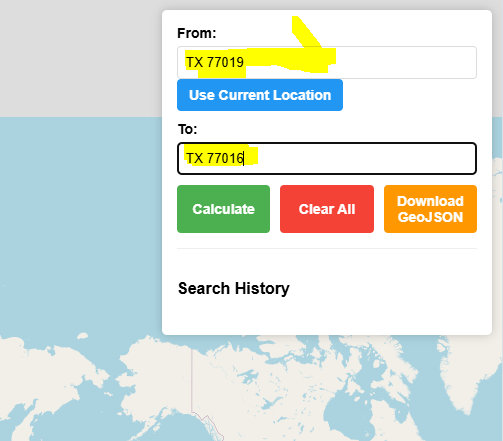
Enter From and To Addresses
2Use Your Current Location as From

Click "📍 My Location" to automatically fill the From field with your current GPS coordinates. Your browser will ask for permission. A green marker appears on your position.
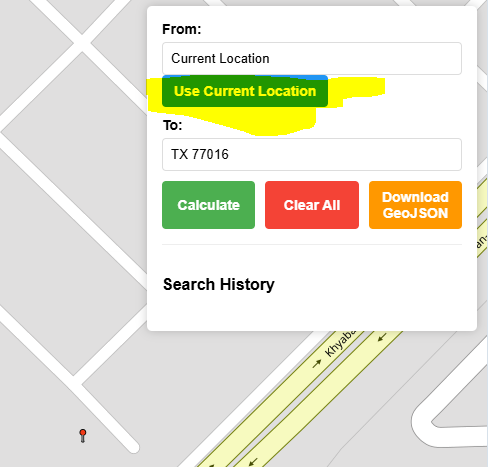
Use Your Current Location as From
3Enter Coordinates Directly

Latitude/longitude coordinates in decimal degrees work in both fields. Format: 29.7519, -95.3677. Useful when you already know the exact geographic position of a point.
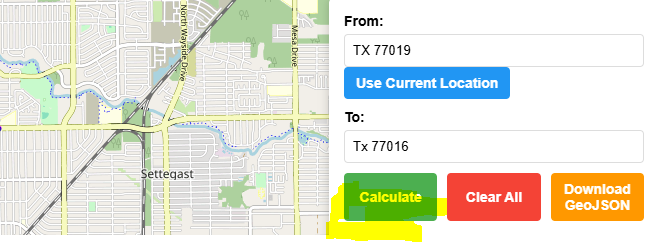
Enter Coordinates Directly
4View Both Lines on the Map

After calculating, the map shows two lines: a magenta dashed line for the straight-line (aerial) path, and a solid blue line for the actual road route. Both markers appear with popups.
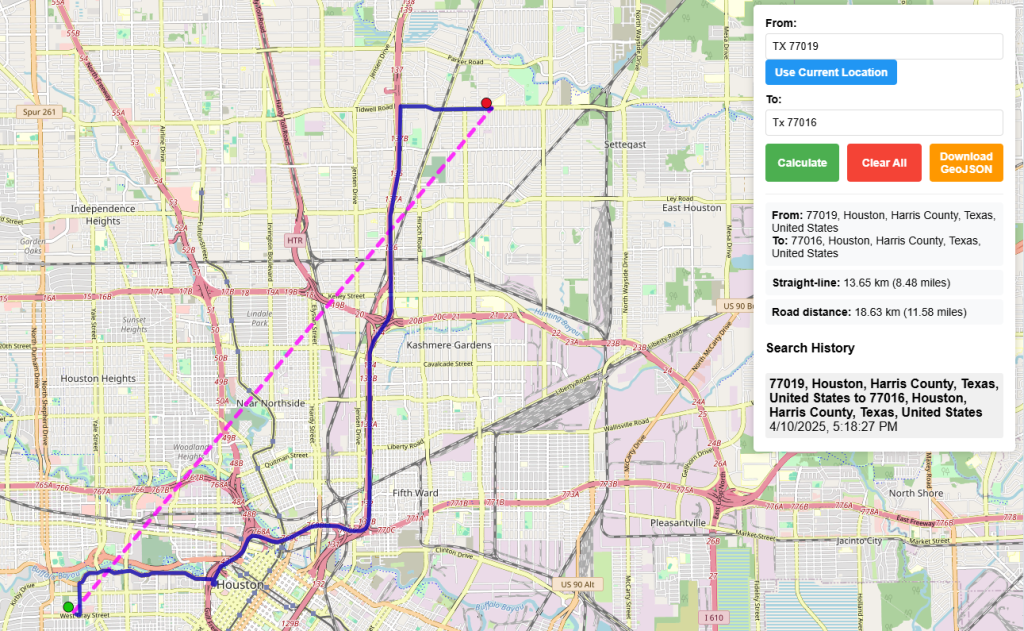
View Both Lines on the Map
5Read the Distance Results

The results panel shows the full address of each location, the straight-line distance in km and miles, and the road driving distance in km and miles. Recent searches appear as clickable history chips.
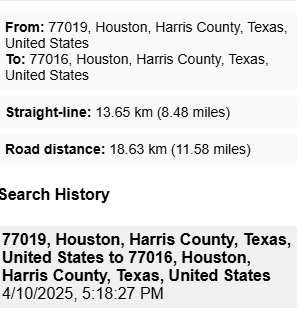
Read the Distance Results
6Clear All and Start Over

Click the red Clear button to remove all markers, lines, and results from the map and reset both inputs. The map returns to the global view, ready for a new calculation.
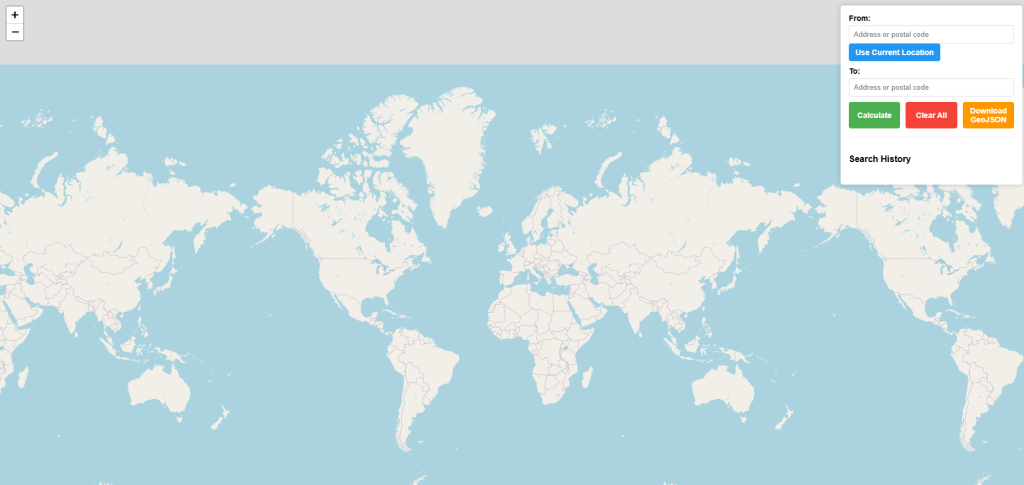
Clear All and Start Over
7Download as GeoJSON

Click GeoJSON to download a standard GeoJSON FeatureCollection with two LineString features — one for the straight-line path and one for the road route — including distance properties.
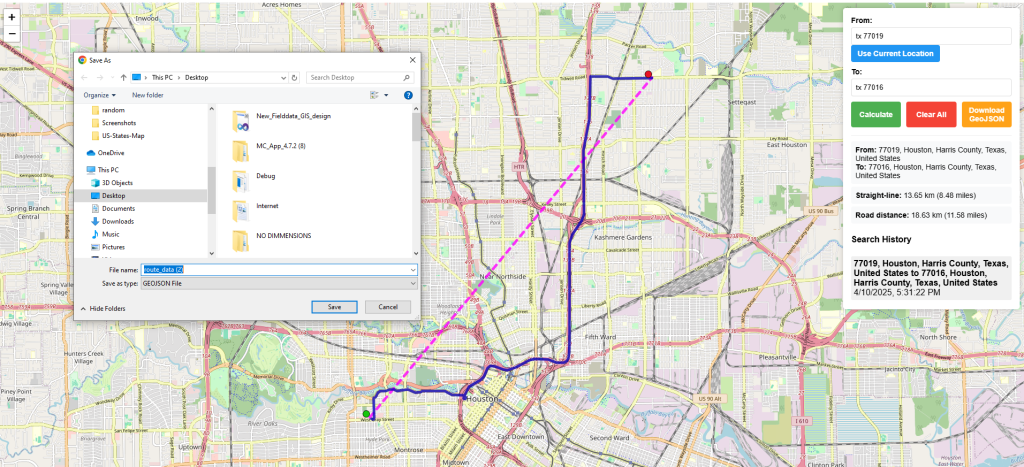
Download as GeoJSON
8Sample GeoJSON Output

The downloaded file contains both paths with distance_km and distance_miles properties. Open it in QGIS, ArcGIS, Mapbox, Google Earth, or geojson.io for further GIS analysis.
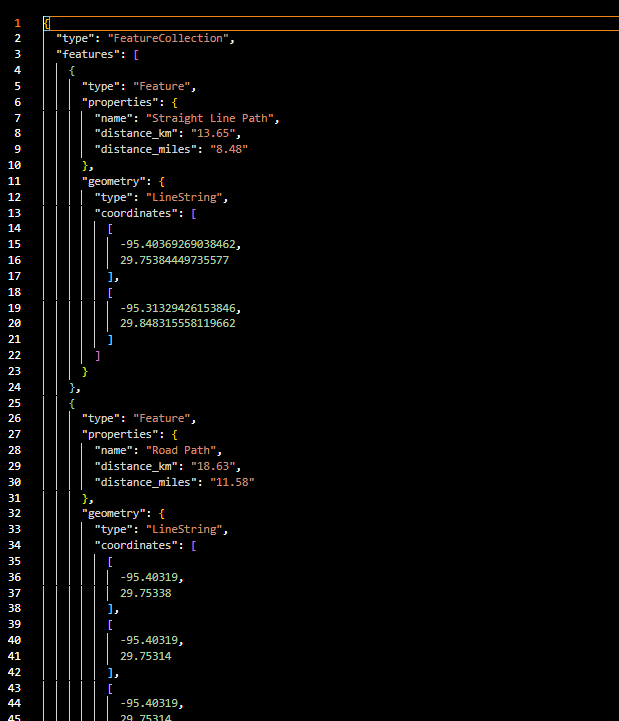
Sample GeoJSON Output
Example — Delivery Zone Check: A courier company in Houston enters a warehouse ZIP code (77019) as From and a customer address (77016) as To. The tool shows 13.65 km straight-line and 18.63 km by road, helping the dispatcher estimate delivery time and fuel cost.

Straight-Line vs Road Distance Explained

TypeAlso Known AsHow CalculatedWhen to Use
━ ━ Straight-lineAerial, as-the-crow-flies, geodesicHaversine formula on WGS84 sphereSignal coverage, coverage radius, bird migration, quick estimates
━━━ Road distanceDriving distance, route distanceOSRM shortest-path routing on OpenStreetMap road networkDelivery time, fuel cost, logistics planning, travel time

Road distance is always ≥ straight-line distance. In urban areas with good road networks the difference is typically 20–40%. In areas with rivers, mountains, or sparse roads the ratio can be much higher.

Distance Unit Reference

UnitSymbolConversionCommon Use
Kilometrekm1 km = 1,000 mInternational standard, most countries
Milemi1 mi = 1.60934 kmUSA, UK, Liberia, Myanmar
Metrem1 m = 0.001 kmShort distances, engineering

Frequently Asked Questions

Q: How accurate is the straight-line distance?
A: The straight-line distance uses the Haversine formula on the WGS84 sphere (Earth radius 6,371 km). The error compared to a full ellipsoidal model is less than 0.5% for any two points on Earth. For all practical planning purposes this is negligible.
Q: What routing engine powers the road distance?
A: The road route uses the OSRM (Open Source Routing Machine) public demo server, which routes on the OpenStreetMap road network. It finds the shortest driving path. OSRM is the same engine used by many navigation and logistics platforms.
Q: Why is the road distance sometimes unavailable?
A: Road routing is only possible between locations that are connected by the road network. If you select two points on different islands with no road bridge, or in areas with very sparse road data in OpenStreetMap, the routing may fail. The straight-line distance is always calculated regardless.
Q: Can I enter coordinates instead of addresses?
A: Yes. Enter decimal-degree coordinates in either field in the format: latitude, longitude — for example: 51.5074, -0.1278. Both positive and negative values are accepted (negative for South/West). The geocoder will find the closest address to those coordinates.
Q: What does the GeoJSON download contain?
A: The downloaded file is a GeoJSON FeatureCollection with two LineString features. The first is the straight-line path with distance_km and distance_miles properties. The second is the full road route geometry with its distance properties. Open it in QGIS, ArcGIS, Mapbox, or geojson.io.
Q: Does the tool work with postal codes and ZIP codes?
A: Yes. The geocoding is powered by Nominatim (OpenStreetMap) which recognises addresses, city names, postcodes, and ZIP codes worldwide. For best results use the full postcode including any district prefix (e.g. SW1A 1AA for the UK, or 90210 for the US).

Open Source & Credits

  • Map library: Leaflet — open-source interactive maps
  • Routing engine: OSRM — open-source routing on OpenStreetMap
  • Geocoding: Nominatim / OpenStreetMap — address and postcode search
  • Map tiles: CARTO Light, OpenStreetMap, Esri (satellite/terrain)
Distance Calculator on Map — Straight-Line & Road Distance | Maplity